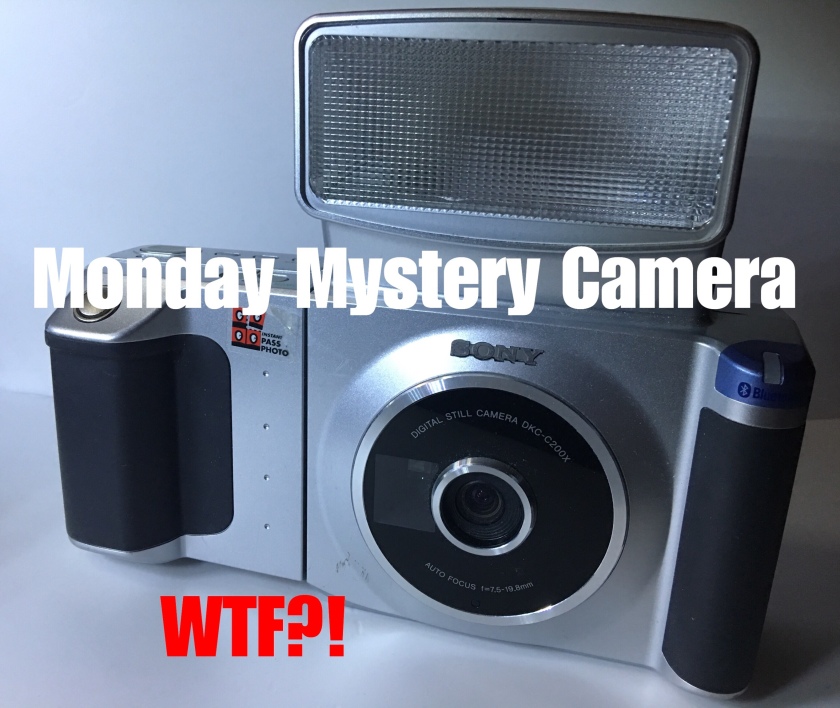

What’s better than a good Monday Mystery Camera on a Tuesday? 😀
Sorry I’m late with this posting but I did get the YouTube video for this in late on a Monday night if that counts!
Anyway, this is just one of those cameras that I don’t feel the need or want to kill myself writing about so I’ll let the video do the talking for those interested since everything I know about it is in the video. I’ll save the double duty for the hardcore camera stuff! It’s basically a Sony DKC-C200X Passport Camera from 2003 and it is one of the largest, goofiest digital cameras I’ve ever seen! 🙂
But does it work? Is it good for anything other than passports?
One thing I’d like to note. The “coffee” thing at the beginning is basically a parody of this much used and cliched scene. I’ve seen it on so many YouTube videos that I’ve lost count! 😀
As far as I can tell, the only way I can use this camera is to have the photos sent via Bluetooth to a compatible Sony Printer which I do not have. Now if anyone out there has this camera and can tell me if there’s a way to send photos from this camera to a laptop or phone I’d appreciate it! Thank you!
 Camera Legend
What a bizarre camera. And you sound smooth and cool like a DJ on an underground jazz radio station.
LikeLiked by 1 person
Haha Thanks Jim! I take that as a complement coming from a man who used to work on radio! 😊 Yes, this is a very bizarre looking camera. Unfortunately Sony did not think anyone else would be interested in it besides postal workers! Thanks for your comments!
LikeLike
By the way, one of the reasons I hate doing these YouTube videos is because I’m not always smooth and cool when the video starts recording! I usually mess up requiring several retakes but this one I was mostly “in the zone” I guess. Thanks! 😊
LikeLike
Only you bro! :-))
I would think you would get the printer (which probably has a unique data format)
since you are the ultimate bargain hunter when it comes to gear.
Enjoyed the video featuring this oddity…
LikeLiked by 1 person
Hi, have you been able to find a way of connecting this or the dkc-c300x to a phone in the end? Thanks Greg.
LikeLiked by 1 person
Hi Greg, try as I might I never did find a way. I don’t think it’s possible. Best thing you can do with these cameras is to get that printer that goes with it. Cheers!
LikeLike
hello,
theres a port below the flash out on the left hand side of the camera, looks kind of trapezoidal; its called a usb-b port. if you get a usb-b cord you can plug it into a computer to transfer your files over!
LikeLiked by 1 person
Thanks so much! This is just the kind of information I need, appreciate your input!
LikeLike
How to access the stored photos: With the next model DKC-C300 this is the way – It may work for the previous model as well:
Connect the USB Cable to the PC
Hold down the PRINT and RELEASE (Shutter button) as the power is switched on to the camera. The SERVICE MENU should briefly flash and then ‘Connecting’ is shown on the camera screen. On the PC there is a new device shown (like a HDD) C300X and a sub folder is DCIM> 100UPXUD and the JPG files are there. All the best…
LikeLiked by 1 person
Thanks for sharing this information! I greatly appreciate all the clearly worded details.
LikeLike
My camera came with 154 ‘Passport’ photos still on the 60MB internal memory !
LikeLiked by 1 person
How to access the stored photos: With the DKC-C200X in the menu set USB to ‘STORAGE’ and not ‘ORIGINAL’ (ORIGNAL is for when using the Sony PC Software). Connect the USB Cable, power on the camera and on the computer there should be a new device shown (like a HDD) C200X. The images should be in sub folders.
LikeLike